Why am I getting 403 Forbidden errors when using a personal lsv2 API key with the LangSmith Client?
Last updated: June 8, 2026
Context
When using a personal lsv2_pt API key with the LangSmith Python client, you may encounter 403 Forbidden errors when calling endpoints such as /runs or /sessions. For example:
from langsmith import Client
client = Client(api_key="lsv2_pt_...")

list(client.list_projects())
# -> 403 Forbidden for url: https://api.smith.langchain.com/sessions?limit=100&offset=0
This can happen even when using the default workspace and without setting any custom endpoint or workspace ID environment variables.
Answer
There are a few things to check and try when encountering this issue:
Verify your API key type. Make sure your key starts with
lsv2_pt(personal token) and notlsv2_sk(service key), as these have different permission scopes.Specify the Workspace ID explicitly. Try passing the
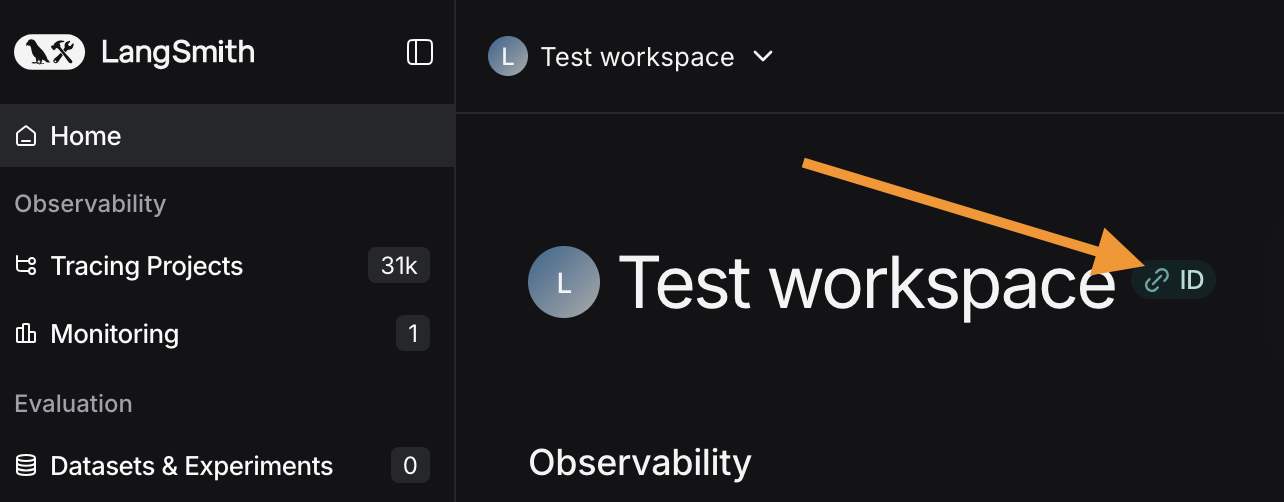
workspace_idparameter when instantiating the client:client = Client(api_key="lsv2_pt_...", workspace_id="your-workspace-id")You can find your Workspace ID in the LangSmith UI, as shown below:
Check your environment variables (especially in Jupyter/Colab environments, where variable caching is common). Run the following to verify they are set correctly:
import os
print(os.getenv("LANGSMITH_PROJECT"))
print(os.getenv("LANGSMITH_TRACING"))
print(os.getenv("LANGSMITH_ENDPOINT"))
print(os.getenv("LANGSMITH_API_KEY"))
Clear cached environment variables if the output does not match your
.envfile:utils.get_env_var.cache_clear()Then reload your environment variables:
from dotenv import load_dotenv
import os
load_dotenv(<path to .env file>, override=True)
Regenerate your API key. If the above steps do not resolve the issue, try revoking your existing API key and generating a new one from the LangSmith UI, then update your code or environment variables with the new key.